
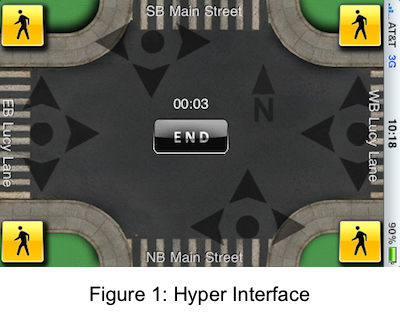
Arguably, the most important part of any software program is the user interface. Software programs with an intuitive interface typically excel while ones with a poor interface fail. Two interfaces are available in TurnCount. The decision to go with two occurred because of the concern that many in the industry would be hesitant to initially adopt the Hyper Interface.
The Hyper Interface offers an amazing intuitive approach to counting traffic. Rather than tapping buttons for vehicle movements, one swipes a finger in the direction of each vehicle or pedestrian. This swipe can either be in the direction of the arrows, as shown in the screen shot to the right, or actually follow the geometry of the intersection. Many hours went into the design of this interface to allow for variabilty as to where the finger swipes can start and end. With a few minutes of practice, looking at the screen is not even needed. This item is one of the many features that distinguishes TurnCount from other counters. Furthermore, audible and visual feedback, as well as truck classification, as noted with the Classic Interface are provided.

The Classic Interface is similar to a traditional turning movement counter. One taps a virtual button, and the button appears visually pressed when tapped. An audible feedback click is also given. Additionally, the movement direction and the number of times the button was tapped during the count session are displayed.
However, there are a few differences between the Classic Interface and previous counting boards. If one double taps a button quickly, a basic truck classification is registered. The counter actually says "TRUCK" to confirm the classification. Searching for a shift button is no longer needed. Furthermore, to identify a pedestrian crossing a particular street, one just has to tap a pedestrian button and drag the thumb over the street being crossed. Audible feedback is provided for each movement. It is all very easy.
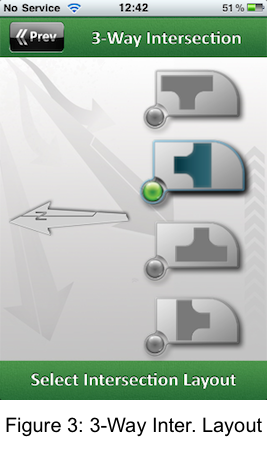
Selecting between three and four way intersections for the display screen is available. You may ask why? Is it really needed? Trafdata approached it from the viewpoint, why not? Using the dynamic, capacitive touch screen display allows a wide variety of input options. Sometimes a company has to try things to see what will work. Trafdata is willing to try new things to advance the profession.
Five-way intersections and roundabouts were considered, but not pursued. Five-way intersections are too infrequent to make it a smart business decision. With respect to roundabouts, Trafdata investigated and had hoped to include it. A decision was made that simply pushing a button to identify when a vehicle enters and exits a roundabout is too simplistic to acccurately count and determine the capacity of an existing roundabout. More information should be included as to where the vehicle is in the roundabout with respect to traffic entering and exiting the intersection. Will rounadbouts be included in a future version? Perhaps. How to effectively implement this with Wi-Fi and/or a cloud based server with multiple data collectors needs to be investigated further. If you have suggestions on roundabout counting, please let me know.
Intersection and business information is entered in this portion of the app to label output fields. All information fields are not currently used for the data output, but are hoped to be added in future versions.
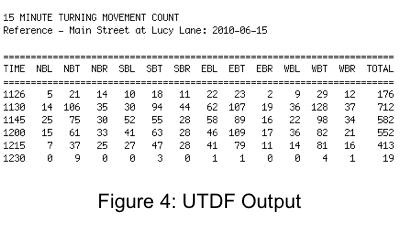
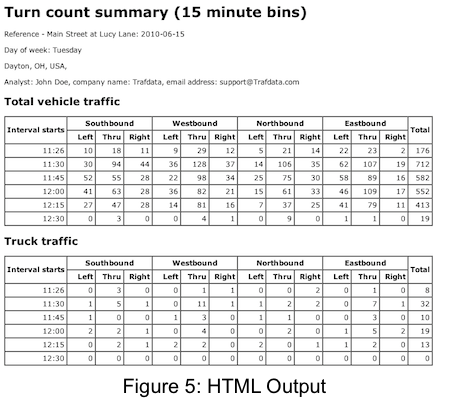
The output for Version 1.0 is basic. More basic than originally envisioned; however, future enhancements are planned. Output is provided in three different formats for every count. A Universal Traffic Data Format file (.vol) is provided for importing into popular traffic signal timing programs. A comma separated value file (.csv) is available to analyze the data in time stamped format. Lastly, a .html file displays count data in 15-minute bins.
An example of the Universal Traffic Data Format (UTDF) is shown to the left. It follows the required text based format. Click on UTDF example for a file created with TurnCount.
The comma separated value allows direct importation of time stamped count data into a spreadsheet for further analysis. Please be aware that a custom cell format needs to be created for the "TIME" field if mathematical operations are to be used on it. Click on CSV example for time stamped data created with TurnCount.
The .html file allows for a variety of uses. One can simply print it out (in PDF if desired), import it into a spreadsheet or post it on the internet. Click on HTML example for a file created with TurnCount.
Future versions will improve on the output. Trafdata plans to improve on the layout of the .html file and add XML output. Only 15-minute bins were selected because once a cloud based server is implemented, the server side software will allow for different bin sizes to be selected. If the cloud element of TurnCount becomes delayed, strong consideration will given to adding the option of 5 and 10 minute bins.

Trafdata was founded in November 2009 to enter the mobile computer software market. This technology shows great promise in improving transportation engineering software while also dramatically reducing costs.


